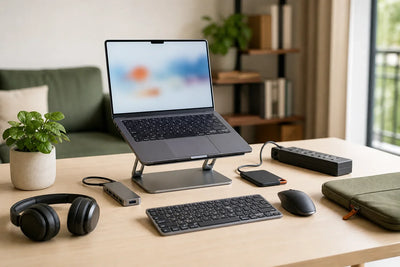
After spending hours working or studying on a laptop, you may realize that the problem is not necessarily the device itself, but how it is positioned on your desk. The screen may sit too low, your workspace may feel crowded, or your setup may become difficult to organize once you add a mouse, keyboard, and external monitor.
This is where a laptop stand can become a practical addition, especially if you rely on your laptop for several hours every day. However, choosing the best laptop stand for work and study is not simply about finding the most attractive design or the most expensive model. You need a stand that supports your laptop's size and weight, provides suitable stability and adjustability, and fits the way you use your device.
A stand designed for a permanent home office may not be the best option for a student who carries a laptop to university every day. Similarly, a lightweight foldable stand designed for travel may not offer the same experience as a larger stand intended for a fixed desk setup.
In this guide from Cart, we will explain the different types of laptop stands, the features worth comparing, and how to choose the right option for work, study, and everyday laptop use.
Building a better setup for work or study? Explore computer accessories at Cart and choose accessories that suit your laptop and the way you use it.
What Is a Laptop Stand and Why Would You Need One?
A laptop stand is designed to position your laptop at a different height or angle than placing it directly on a desk.
Some laptop stands have a fixed position, while others allow you to adjust the height or viewing angle. There are also foldable models designed specifically for users who regularly move between different locations.
The real value of a laptop stand is not simply that it raises your laptop. It can also make your overall setup more flexible and organized.
Position Your Laptop Screen at a More Suitable Height
When a laptop sits directly on a desk, its screen can be relatively low for many setups.
A stand allows you to raise the display or change its angle according to your desk, chair, laptop size, and preferred working position.
There is no single ideal height that works for everyone. The goal is to give yourself more flexibility when positioning the display rather than being limited to the laptop's default position on the desk.
Make Better Use of Desk Space
Raising your laptop can free up some space underneath or around the device, which can be particularly useful on smaller desks.
It can also make it easier to organize your mouse, keyboard, cables, and other accessories when every part of your setup has a clear place.
Use Your Laptop With an External Monitor
If you use an external monitor alongside your laptop display, a stand can help you arrange both screens more effectively.
This can be particularly useful for working from home, programming, writing, design, and other workflows that involve multiple windows.
Build a More Practical Laptop Setup
A laptop stand can become more useful when it is part of a complete setup.
You can combine it with an external keyboard and mouse, then add a USB-C hub if you need to connect a monitor, storage drives, or other accessories.
If you are still deciding which accessories deserve priority, read our guide to the best laptop accessories for work and study.
Do You Really Need a Laptop Stand?
Despite its advantages, a laptop stand is not essential for every user.
If you only use your laptop for short periods or constantly work while moving between locations, a stand may not be the first accessory you need.
Its value becomes more noticeable when your laptop is your primary device for work or study.
You May Need a Laptop Stand If You:
Use your laptop for several hours at a desk, want more flexibility in positioning the screen, regularly use an external keyboard and mouse, connect an external monitor, or want to organize your workspace more effectively.
A foldable stand can also be useful if you work or study from several locations but still want the option to raise your laptop wherever you go.
A Laptop Stand May Not Be a Priority If You:
Use your laptop only for short periods, regularly rely on the built-in keyboard and touchpad with the device directly in front of you, or do not want to carry another accessory while commuting.
The point is not that everyone needs a laptop stand. It should solve a genuine problem in the way you use your laptop.
How to Choose the Best Laptop Stand for Work and Study
If you compare different laptop stands, you will quickly notice major differences in materials, design, adjustability, and portability.
Instead of choosing based on appearance alone, consider the following factors.
1. Check Compatibility With Your Laptop's Size and Weight
This should be one of the first specifications you check.
A stand that works well with a 13-inch laptop may not necessarily be designed for a larger and heavier gaming laptop.
Some products specify a clear range of supported laptop sizes. For example, the Yesido LP02 supports laptops from 11 to 17 inches, while the UGREEN LP339 supports devices up to 17.3 inches.
Always check the supported dimensions and weight capacity when available instead of relying on product photos alone.
2. Choose the Level of Adjustability You Need
Some laptop stands provide a fixed angle, while others let you change the height, angle, or both.
If several people use the same stand or you regularly work at different desks, an adjustable laptop stand can provide greater flexibility.
If you have a permanent desk and already know which position works for your setup, a simple fixed stand may be enough.
3. Pay Attention to Stability
Having several adjustment levels is not particularly useful if the stand moves or wobbles easily.
Stability becomes especially important if you regularly touch the laptop screen or occasionally use its built-in keyboard while it is on the stand.
Consider the base design, contact points with the desk, and how securely the stand maintains its position after adjusting the height or angle.
4. Consider Materials and Build Quality
Laptop stands are available in aluminum, plastic, and designs that combine several materials.
However, there is no simple rule that one material automatically makes every stand better.
Hinge quality, base design, weight capacity, and overall construction all affect the experience.
Aluminum is common in many desk-oriented stands, while lighter designs may be more practical for frequent travel. Evaluate the complete design rather than choosing based on material alone.
5. Choose a Design That Does Not Block Laptop Vents
Check where your laptop's ventilation openings are located before choosing a stand.
An open design can help keep these areas unobstructed, while some stand designs may not be suitable for laptops with vents in specific areas underneath the device.
This is particularly important with adhesive stands. For example, the MOFT Adhesive Laptop Stand is designed for laptops up to 16 inches, but its compatibility depends on the location of the laptop's bottom vents.
6. Look for Anti-Slip Contact Points
Silicone or rubber contact points have a practical purpose.
They can help keep the laptop in position and reduce direct contact between the device and harder surfaces on the stand.
These small details are worth considering, especially when placing an expensive laptop on an elevated stand.
7. Consider Weight and Portability
If the stand will stay on your desk permanently, its weight may not be particularly important.
For students and people who follow a hybrid work schedule, however, the difference between a heavy desk stand and a compact foldable model can become noticeable every time you pack your bag.
Decide whether you primarily need a desk stand or a portable laptop stand before comparing models.
8. Do You Need a Foldable Laptop Stand?
A foldable laptop stand can be particularly useful if you move between university, home, the office, cafés, or coworking spaces.
However, foldability alone does not make a stand suitable for travel. Also consider its folded dimensions, weight, stability, and how quickly you can set it up.
Types of Laptop Stands: Which One Is Right for You?
There is no single type that can be considered the best laptop stand for every user. Different designs solve different problems.
Fixed Laptop Stand
A fixed stand works well in a setup that rarely changes.
It can be a straightforward choice for a desk if you already know the height and angle you prefer and do not need to adjust them regularly.
Adjustable Laptop Stand
An adjustable laptop stand gives you more control over the position of your device.
It is useful for home offices, shared workspaces, or users who want to experiment with different heights and angles before finding the right position.
Foldable Laptop Stand
This is often one of the most practical options for students and frequent travelers.
A foldable stand can be packed into a bag and used at university, at work, or at home.
However, compare its weight, dimensions, and stability because not all portable laptop stands provide the same experience.
Vertical Laptop Stand
A vertical laptop stand serves a slightly different purpose.
Instead of raising an open laptop, it is typically used to store the laptop vertically and free up desk space, particularly in setups that rely on an external monitor, keyboard, and mouse.
It should not be confused with a traditional laptop stand designed for using the laptop while it is open.
Laptop Riser
A laptop riser provides a straightforward way to elevate the device and may offer fewer adjustment options than more advanced stands.
It can be suitable if you want a simple, permanent setup and do not need to change the height frequently.
|
Stand Type |
Best For |
Main Advantage |
What to Consider |
|
Fixed Stand |
Permanent desk setup |
Stability and simplicity |
Limited adjustability |
|
Adjustable Stand |
Everyday work |
Height and angle control |
Hinge quality and stability |
|
Foldable Stand |
Study and travel |
Portability |
Weight and stability |
|
Vertical Stand |
Desk organization |
Saves desk space |
Not designed for traditional open-laptop use |
|
Laptop Riser |
Simple setup |
Easy laptop elevation |
Fewer adjustment options |
Best Laptop Stand Based on How You Use Your Laptop
The way you use your laptop matters more than the number of features printed on the product box.
Best Laptop Stand for Working From Home
For long work-from-home sessions, prioritize stability and the ability to adjust the height or angle.
Since you probably will not need to pack the stand every day, stability and adjustability can be more important than minimizing weight.
A stand can also be more practical when paired with an external keyboard and mouse.
Best Laptop Stand for Students
Students have different priorities: low weight, compact dimensions, and easy folding.
If you already carry a laptop, charger, books, and other essentials every day, you probably do not want to add a large and heavy stand to your bag.
Look for a foldable laptop stand that is quick to set up while still providing suitable support for your device.
Best Laptop Stand for the Office
For a permanent office setup, portability becomes less important.
Focus on stability, laptop compatibility, and the height you need based on the way your monitor, keyboard, and mouse are arranged.
If your desk is small, also consider how much surface area the stand occupies.
Best Laptop Stand for Travel and Commuting
Weight and folded size should be among your priorities.
A stand that looks compact on a desk may still take up significant space in a backpack, so check the folded dimensions when available.
There are also solutions that attach directly to the laptop, such as the MOFT Adhesive Laptop Stand. According to its specifications, it supports laptops up to 16 inches, making it different from traditional stands that need to be carried separately.
Best Laptop Stand for Designers and Programmers
If your work involves multiple windows or an external display, think of the laptop stand as part of your screen arrangement rather than simply a place to put the laptop.
A stand can help position the laptop display alongside an external monitor, while a separate keyboard and mouse give you greater flexibility when arranging the workspace.
Best Laptop Stand for Larger Laptops
With 16- and 17-inch laptops, never assume that a stand will work simply because the laptop physically fits on top of it.
Check the maximum supported size and weight, as well as the dimensions of the stand's platform.
For example, UGREEN LP339 supports laptops up to 17.3 inches, while Yesido LP02 supports devices from 11 to 17 inches.
Fixed vs. Adjustable Laptop Stand: Which Is Better?
The word "adjustable" does not automatically mean that a product is the better choice.
|
Feature |
Fixed Laptop Stand |
Adjustable Laptop Stand |
|
Stability |
Good depending on design |
Depends on design and hinges |
|
Height adjustment |
Limited or unavailable |
Available depending on model |
|
Angle adjustment |
Limited |
More flexible |
|
Desk use |
Very suitable |
Very suitable |
|
Portability |
Depends on size |
Depends on design and weight |
|
Multiple users |
Less flexible |
Easier to adapt |
If you have a permanent desk and already know the position you want, a fixed stand may be simple and effective.
If you frequently change your workspace or several people use the same stand, an adjustable model may offer more value.
Aluminum vs. Plastic Laptop Stand: Which Should You Choose?
Aluminum is commonly used in laptop stands because it can provide a relatively rigid structure while maintaining a slim design. However, the material alone does not determine whether a stand is good.
Hinge quality, frame thickness, base design, anti-slip contact points, and weight capacity also matter.
Plastic or mixed-material stands can be lighter and more practical for travel in some designs.
Instead of asking only, "Is aluminum better than plastic?" consider the questions that matter more: Is the stand stable? Does it support the weight of your laptop? Is it easy to carry? Does it offer the adjustments you need?
What Is the Right Height for a Laptop Stand?
There is no universal height that works for every user.
The right position depends on your height, chair, desk, screen size, and viewing distance.
One advantage of an adjustable laptop stand is that it gives you more freedom to position the screen according to your workspace.
However, once you raise the laptop significantly, using its built-in keyboard and touchpad may become less practical. That is where external accessories become useful.
Do You Need a Keyboard and Mouse With a Laptop Stand?
Not necessarily.
If the stand only changes the laptop angle slightly, you may still be able to use the built-in keyboard comfortably.
When the screen is raised significantly, however, a separate keyboard and mouse can be more practical because you can position them independently from the screen.
Explore keyboards and mice at Cart if you are building a more complete desk setup.
How to Build a Practical Laptop Setup With a Stand
The easiest way to get more value from a laptop stand is to think of your setup as one connected system.
Start with the stand to position the screen. Then place your keyboard and mouse where they are comfortable to use.
If your laptop has limited ports, a USB-C hub can help connect an external display, storage devices, and other accessories through a more convenient setup. You can learn more in our guide to choosing the best USB-C hub for laptop use.
If reducing cable clutter is a priority, you can also pair the stand with a wireless mouse from Cart and a wireless keyboard from Cart.
You do not need to buy everything at once. Start with the issue that affects your daily experience the most and upgrade the rest of your setup gradually.
Best Laptop Stands Available at Cart
Laptop stands differ significantly in portability, supported laptop sizes, and adjustment options. The following examples are designed for different types of users and setups.
UGREEN LP339 Adjustable Laptop Stand – For Larger Laptops and Desk Use
The UGREEN LP339 is designed for laptops up to 17.3 inches and provides adjustable height up to 201 mm according to its listed specifications.
That makes it worth considering for a desk or home office, especially if you use a larger laptop and want more control over screen height.
Best for: office setups, working from home, and larger laptops.
Yesido LP02 Laptop Stand – For Multiple Adjustment Levels
The Yesido LP02 features an aluminum design with eight adjustment levels and a listed height range from 80 to 150 mm.
It supports laptops from 11 to 17 inches and uses an open structure around the laptop.
This type of stand can be useful if you want to experiment with several viewing angles instead of relying on a single fixed position.
Best for: work, study, and setups that benefit from multiple angle options.
Lenovo Portable Metal Laptop Stand – For a Simple Desk Setup
The Lenovo Portable Metal Laptop Stand uses a metal design with an 18-degree tilt and is designed for laptops up to 15 inches according to its listed specifications.
It is better suited to someone who does not need several adjustment levels and wants a relatively straightforward way to position a laptop on a desk.
Best for: simple desk setups and laptops up to 15 inches.
MOFT Adhesive Laptop Stand – For Maximum Portability
The MOFT Adhesive Laptop Stand takes a different approach from a traditional desktop stand because it attaches directly to the laptop and can be unfolded when needed.
According to its listed specifications, it supports laptops up to 16 inches. However, users should pay attention to the location of ventilation openings on the bottom of their device before using an adhesive stand.
Best for: students, travel, hybrid work, and users who want to carry as few separate accessories as possible.
Promate DeskMate-5 – For a Simple Aluminum Desk Stand
The Promate DeskMate-5 offers an aluminum design intended to elevate and angle the laptop while maintaining a relatively open structure around the device.
It can be considered by users who want a straightforward desk-oriented stand rather than a more complex setup.
Best for: office desks and everyday laptop use.
Quick Comparison of Laptop Stands
|
Laptop Stand |
Supported Laptop Size |
Adjustable |
Design |
Best For |
|
UGREEN LP339 |
Up to 17.3 inches |
Yes, up to 201 mm |
Adjustable desk stand |
Larger laptops and work |
|
Yesido LP02 |
11–17 inches |
8 levels |
Open aluminum design |
Work and study |
|
Lenovo Portable Metal Stand |
Up to 15 inches |
18° tilt |
Simple metal design |
Desk use |
|
MOFT Adhesive Stand |
Up to 16 inches* |
Multiple use positions |
Adhesive and portable |
Travel and commuting |
|
Promate DeskMate-5 |
Check device compatibility |
Angled design |
Aluminum |
Office and everyday use |
*Check the position of the ventilation openings underneath your laptop before using an adhesive stand.
Because product availability can change, always review the latest product specifications and availability before ordering.
Does a Laptop Stand Help With Ventilation?
It depends on the design of both the stand and the laptop.
An open laptop stand can help keep areas around the laptop's ventilation openings unobstructed compared with placing the device on a surface that may block them.
However, a laptop stand should not automatically be treated as a cooling system.
If your laptop has a genuine overheating problem, it is important to understand the cause rather than assuming that raising the device will solve it.
Laptop Stand vs. Cooling Pad: What Is the Difference?
These products are designed for different purposes.
|
Laptop Stand |
Cooling Pad |
|
Raises and repositions the laptop |
Primarily designed to provide additional cooling |
|
Focuses on device positioning and workspace organization |
Focuses on airflow and cooling |
|
Usually has no fans |
Usually includes fans |
|
Can be foldable or adjustable |
Often larger because of the cooling system |
|
Suitable for work, study, and desk organization |
More relevant when additional cooling is required |
If your main problem is screen positioning or workspace organization, a laptop stand is the more relevant product category.
If your main concern is temperature, investigate the cause and requirements of your laptop before deciding on a cooling solution.
Common Mistakes to Avoid When Buying a Laptop Stand
One of the biggest mistakes is choosing a stand based entirely on its appearance. A product may look excellent in photos but still be unsuitable for the size or weight of your laptop.
Do not assume that more adjustment levels automatically mean better quality either. Stability and hinge quality are more important than having several positions you may never use.
Another common mistake is ignoring ventilation openings, particularly with stands that cover a significant part of the bottom of the laptop.
If you commute every day, avoid buying a heavy stand and then discovering that you do not want to carry it. On the other hand, do not make low weight your only priority if the stand will remain on your desk throughout the year.
Finally, if you intend to raise the laptop significantly, think about where your keyboard and mouse will go before purchasing the stand.
Is a Laptop Stand Worth Buying?
It depends on how you use your laptop.
If your laptop is your main device for work or study and you use it at a desk every day, the right stand can give you more flexibility when positioning the screen and arranging your accessories.
It can also be particularly useful when you already use an external keyboard, mouse, or monitor.
If you only use your laptop occasionally or rarely work from a fixed location, a stand may be a lower priority than accessories such as a protective bag, mouse, or additional charger.
Do not buy a laptop stand simply because it has become a common feature in desk setup photos. Buy one when it has a clear role in improving the way you use your laptop.
How to Choose a Laptop Stand for Your Budget
You do not necessarily need to start with the most expensive option.
Basic Laptop Stand
If you simply need to raise your laptop to a fixed position, a basic and stable stand may be enough.
Mid-Range Laptop Stand
If you want to adjust the height or angle and use the stand in several locations, look for an adjustable or foldable design with suitable stability.
Advanced Laptop Stand
Some users may benefit from more advanced desk solutions.
For example, the Promate Raizer available at Cart combines monitor and laptop support with motorized height adjustment, an integrated USB hub, USB-C and USB connections, and a listed load capacity of up to 20 kg.
This type of product is clearly designed for a more advanced workstation rather than simply raising a laptop.
The key is to pay for features you will actually use.
Discover Laptop Stands and Accessories at Cart
Choosing the best laptop stand for work and study starts with understanding how you use your laptop rather than focusing only on the brand name or product design.
First, check your laptop's size and weight. Then decide whether you need a fixed or adjustable stand and whether it will stay on your desk or travel in your bag every day.
From there, compare stability, materials, adjustment options, ventilation design, and portability.
If you are building a complete laptop setup, browse computer accessories at Cart to find keyboards, mice, and other accessories for work and study.
Frequently Asked Questions About the Best Laptop Stand for Work and Study
What Is the Best Laptop Stand for Work and Study?
The best laptop stand is one that supports the size and weight of your device while providing the right level of stability and adjustability for your needs. For a permanent desk, stability and height adjustment may be the priorities. For students and commuters, portability and foldability may matter more.
Is a Laptop Stand Useful for Everyday Use?
It can be very useful if you spend several hours working at a desk and want more flexibility in positioning your laptop screen or organizing your workspace. If your laptop use is brief or occasional, it may be less important.
How Do I Know Whether a Laptop Stand Fits My Laptop?
Check the supported laptop sizes and weight capacity when provided by the manufacturer. Do not rely only on product images, particularly if you use a 16- or 17-inch laptop or a heavier gaming laptop.
Is an Adjustable Laptop Stand Better Than a Fixed Stand?
Not necessarily. An adjustable stand provides more flexibility, while a fixed stand can work perfectly well for a permanent desk setup. Stability, construction quality, and compatibility are more important than adjustability alone.
Can I Use a Laptop Stand With a 17-Inch Laptop?
Yes, provided the stand is designed for that size and weight. For example, the Yesido LP02 supports laptops up to 17 inches, while the UGREEN LP339 supports laptops up to 17.3 inches according to their listed specifications.
Do I Need a Keyboard and Mouse With a Laptop Stand?
Not always. If the stand only raises or tilts the laptop slightly, you may continue using the built-in keyboard. If the laptop is raised significantly, an external keyboard and mouse can make the setup more practical.
Does a Laptop Stand Improve Ventilation?
An open stand can help keep laptop ventilation areas unobstructed, but it is not a replacement for the laptop's cooling system. The effect depends on the design of both the stand and the laptop.
What Is the Difference Between a Laptop Stand and a Cooling Pad?
A laptop stand is primarily designed to raise and position the device, while a cooling pad is designed to provide additional airflow and usually includes fans. They solve different problems.
Is a Foldable Laptop Stand Good for University?
Yes, particularly if it is lightweight, compact when folded, and stable enough for your laptop. Portability is one of the most important considerations for students who carry their devices every day.
Is an Aluminum Laptop Stand Better Than a Plastic One?
Not automatically. Material matters, but overall design, stability, hinge quality, weight capacity, and portability are more important when evaluating the complete product.
Can I Use a Laptop Stand With an External Monitor?
Yes. A laptop stand can help position the laptop display alongside an external monitor. When combined with an external keyboard and mouse, it can provide a more flexible workspace.
Conclusion: How to Choose the Best Laptop Stand for You
There is no single best laptop stand for work and study that works for everyone.
If the stand will remain on your desk, focus on stability, compatibility, and the ability to position your screen appropriately. If you are a student or commute regularly, prioritize weight, folded size, and portability. If you use a larger laptop, always start by checking the supported device dimensions and weight.
Ultimately, focus on four factors: laptop compatibility, stability, adjustability, and how you use your device every day.
You do not need the most expensive stand or the model with the longest list of features. You need one that solves a real problem and works naturally with the rest of your laptop setup.
Ready to build a more practical laptop setup? Explore Cart Jordan and discover laptop and computer accessories for work, study, and everyday use.