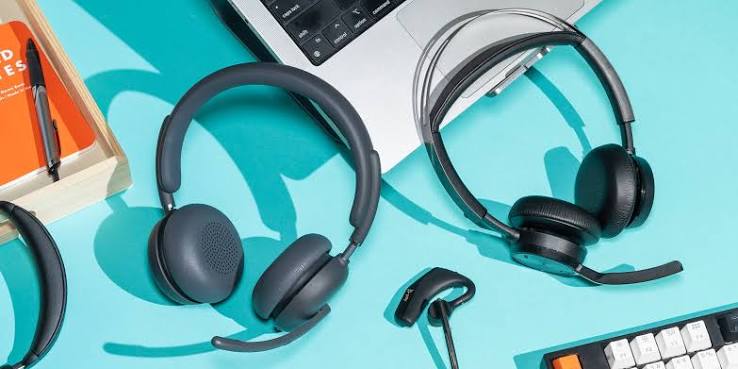
Online meetings have become a normal part of the working day. Whether you work from home, manage team meetings, speak with clients, or constantly switch between phone calls and laptop meetings, a good pair of headphones is now a genuine work tool rather than something you only use for music.
However, choosing the best headphones for work and online meetings requires slightly different priorities from choosing headphones for music or the gym. A pair may offer powerful bass and enjoyable sound but struggle to capture your voice clearly. Another may provide excellent ANC but become uncomfortable halfway through a long meeting.
The right choice is not necessarily the most expensive pair or the one with the longest list of features. It is the one that fits the way you actually work. In this guide, we will explain the specifications that matter most, compare different headphone designs, and highlight options available on Cart to help you choose the right headphones for work, calls, and online meetings.
What Are the Most Important Features in Headphones for Work and Online Meetings?
Before comparing specific models, start by setting your priorities. With work headphones, powerful bass or driver size should not necessarily be at the top of the list. Focus first on the features that directly affect your calls and comfort throughout the working day.
|
Feature |
Why It Matters for Work |
Priority |
|
Microphone quality |
Helps your voice reach the other person clearly |
Essential |
|
Call Noise Reduction / ENC |
Helps reduce surrounding noise during calls |
High |
|
Comfort |
Important for meetings and extended use |
Essential |
|
Battery life |
Helps the headphones last through your working day |
High |
|
Multipoint |
Useful when switching between a laptop and phone |
Important |
|
ANC |
Helps reduce the noise you hear |
Depends on your workspace |
|
Connection stability |
Helps prevent interruptions during meetings |
Essential |
|
Transparency Mode |
Lets you hear your surroundings when needed |
Useful |
You do not necessarily need headphones that score highly in every category. The goal is to identify which features matter in your particular working environment.
Someone working from a quiet room at home will not need the same level of noise cancellation as someone working from a coworking space. Similarly, someone who spends five hours a day in meetings should give comfort and microphone performance much more weight.
How to Choose the Best Headphones for Work and Online Meetings
Start with your working day, not the product name. How many hours do you spend on calls? Do you work somewhere quiet? Do you use a laptop and phone together? Are you regularly moving between different workplaces?
Your answers determine which features are worth paying for.
Microphone Quality Comes Before Music Quality
If meetings are the main reason you need headphones, what the other person hears is just as important as what you hear—sometimes even more important.
A pair of headphones can sound excellent for music without delivering equally good performance during calls. Check the microphone system and any noise-processing technologies designed specifically for voice calls.
Some headphones use multiple microphones to help capture your voice and process surrounding noise. But do not get distracted by numbers. Having four microphones does not automatically make a pair better than every model with two.
Microphone placement, voice processing, and the environment in which you use the headphones can all affect the result.
If calls and meetings take up a large part of your day, put voice clarity + call noise reduction + comfort ahead of powerful bass, Gaming Mode, or other features you may rarely use for work.
ANC vs. ENC: Which Is More Important for Meetings?
One of the most common mistakes when buying headphones for work is confusing ANC with ENC.
Active Noise Cancellation, or ANC, focuses on reducing the external noise reaching your ears. If you work around constant background noise, in an open office, or in a café, ANC can make it easier to hear your meeting and stay focused.
ENC and Call Noise Reduction technologies, on the other hand, are used in the context of processing surrounding noise during calls to help make your voice clearer to the other person.
In practical terms:
|
Your Problem at Work |
Feature to Look For |
|
I cannot hear the meeting because of background noise |
ANC |
|
The other person can hear the noise around me |
ENC / Call Noise Reduction |
|
I work in an open office or busy environment |
ANC + good call noise processing |
|
I work in a quiet room |
A good microphone may matter more than ANC |
Having ANC does not automatically mean the person on the other end will stop hearing your background noise. Similarly, ENC for calls does not mean the headphones will block the noise that you hear.
If you want to understand these features in more detail before comparing products, check our guide on how to choose the right Bluetooth headphones for a broader look at the specifications that matter before buying.
Comfort Is Not an Extra Feature During Long Meetings
Comfort may seem like a secondary consideration when reading a specification sheet, but it quickly becomes one of the most important factors when you wear headphones for three or four hours every day.
If the headphones put too much pressure on your ears or constantly need to be adjusted, powerful ANC or the latest Bluetooth version will not matter very much.
Think about how long you usually wear your headphones without a break.
If your meetings are short and spread throughout the day, True Wireless Earbuds can be extremely practical. If you spend hours at a desk, you may prefer comfortable Over-Ear Headphones or an Open-Ear or Semi-In-Ear design that feels less intrusive, depending on what your ears find comfortable.
Everyone's ears are different, so there is no single design that will be the most comfortable for every user.
Wireless Earbuds vs. Over-Ear Headphones for Work
This is one of the most important decisions when choosing headphones for work because the two designs provide very different experiences.
|
Factor |
Wireless Earbuds |
Over-Ear Headphones |
|
Portability |
Excellent |
Lower |
|
Short meetings |
Excellent |
Excellent |
|
Working for hours |
Depends on design |
Can be very comfortable |
|
Call quality |
Depends on model |
Depends on model |
|
Battery life |
Good + Charging Case |
Can be longer |
|
Noise isolation |
Varies by model |
Can be strong |
|
Working while traveling |
Excellent |
Less practical |
|
Size |
Very compact |
Larger |
If you move around frequently and want headphones you can keep in your pocket and use with either your phone or laptop, Wireless Earbuds are generally more practical.
If you spend most of the working day at a desk and wear your headphones for long periods, comfortable Over-Ear Headphones may suit you better.
You do not have to decide based on the category alone. Explore the Headphones & Sounds section on Cart to compare different designs based on the way you work.
Why Is Multipoint Important for Work?
Imagine that you are working on your laptop and using your headphones for a meeting, then a phone call comes in.
When headphones support Bluetooth Multipoint, supported models can maintain connections with two compatible devices at the same time. This can make moving between your laptop and phone easier than repeatedly pairing your headphones again.
Multipoint is particularly useful if you use your laptop and phone throughout the working day, work remotely, manage frequent calls, or constantly switch between meetings and phone conversations.
However, do not assume that headphones capable of pairing with both your phone and laptop automatically support Multipoint. Being able to pair with several devices is not necessarily the same as maintaining simultaneous connections.
If your working day depends on multiple devices, this can be a much more useful feature than paying extra for an audio feature you rarely use.
How Much Battery Life Do You Need for a Full Working Day?
A large battery number can look impressive, but it needs to be interpreted correctly.
With Wireless Earbuds, a claim such as "40 Hours Battery" may refer to the total listening time after repeatedly recharging the earbuds with the Charging Case—not 40 hours of continuous use from the earbuds themselves.
For work, pay attention to:
Talk Time: How long can you use the earbuds during calls?
Single-Charge Battery: How long do the earbuds themselves last?
Total Battery: What is the total battery life with the charging case?
Fast Charging: What happens if you notice a low battery ten minutes before an important meeting?
If your working day includes long meetings, Talk Time may be more useful than the large total battery number printed on the packaging.
For example, the WiWU T31 ENC available on Cart offers up to approximately 7.5 hours of talk time, up to 8 hours of music playback on a single charge, and up to 40 hours of total battery life with the case, according to the listed product specifications.
It also supports fast charging, with 10 minutes of charging providing up to 2.5 hours of playback according to the product specifications. That can be particularly useful when you discover your battery is low shortly before a meeting.
Do You Need ANC When Working from Home?
Not necessarily.
If you have a quiet office or dedicated room, ANC may not offer enough value to make it one of your main buying priorities. Investing in a better microphone, a more comfortable design, or longer battery life may be more useful.
The situation changes if you work in a busy home. ANC can help reduce the sounds reaching your ears and make it easier to concentrate on your meeting.
If you work from a café, coworking space, or open office, combining effective ANC with good call noise processing becomes more useful. The first helps you concentrate, while the second can help improve what the other person hears.
The point is not that every pair of work headphones needs ANC. Its value depends on where you work.
Best Headphones for Work and Online Meetings Based on Your Needs
Instead of looking for a long list of headphones ranked from first to tenth, start with the problem you want your headphones to solve.
Do you need clearer calls? Better comfort? A budget-friendly option? Noise cancellation?
Once you know the answer, choosing the right product becomes much easier.
WiWU T31 ENC: A Practical Option for Everyday Calls and Meetings
If call clarity is one of your priorities, the WiWU T31 ENC on Cart is worth comparing.
The earbuds use a four-microphone ENC system designed to help reduce surrounding noise during calls and provide up to approximately 7.5 hours of talk time according to the listed specifications.
They also feature a Half-In-Ear design, Bluetooth 5.3, fast charging, and up to 40 hours of total battery life with the charging case.
That combination of features makes them particularly relevant for work calls, video conferences, and everyday commuting.
If calls are a major part of your working day, explore the WiWU T31 ENC on Cart and compare its specifications with the length of your meetings and your working environment.
Samsung Galaxy Buds Core: An ANC Option for Galaxy Users
If you use a Samsung Galaxy phone and want earbuds from the same ecosystem with Active Noise Cancellation, the Samsung Galaxy Buds Core is another option to consider.
ANC makes them relevant for users who work in noisy environments and want to reduce surrounding sound during meetings or while concentrating on other tasks.
However, do not choose them simply because you own a Samsung phone. Compare their microphone performance, comfort, battery life, and other features with the way you actually work.
If you use Galaxy devices and want a broader comparison, check our guide to the best headphones for Samsung phones to understand when Galaxy Buds make sense and when another Bluetooth option may suit you better.
WiWU T28 ENC: A Budget-Friendly Option for Meetings and Calls
If your budget is limited and you do not need a long list of advanced features, Cart also offers budget-oriented options such as the WiWU T28 ENC.
The goal at this price point is not necessarily to find headphones with every premium feature. Instead, focus on the essentials: suitable connectivity, a microphone for calls, and a design you can comfortably use within your budget.
Before buying, compare it with the other products in the Wireless Earbuds section on Cart. A relatively small difference in price may give you better battery life, a more suitable design, or additional features that make more sense for your working day.
Over-Ear Headphones for Long Working Hours
If your job involves sitting in front of a laptop for hours, do not limit your search to earbuds.
Cart's selection includes Over-Ear options from brands such as Anker/Soundcore and JBL. This category is worth considering for users who prioritize desk-based work and extended listening sessions.
Some more advanced models also offer useful work features such as ANC, long battery life, and Multipoint. Always check the specifications of the individual model rather than assuming every pair of Over-Ear Headphones offers the same features.
Prefer larger headphones for desk-based work? Browse the Headphones & Sounds section on Cart and compare Over-Ear Headphones with Wireless Earbuds before making your choice.
Best Headphones for Working from Home
Working from home does not automatically mean you need the most expensive headphones available.
If your environment is quiet, focus on three key factors: microphone quality, comfort, and battery life.
The microphone matters because you want your voice to reach other participants clearly. Comfort matters because you may wear the headphones for hours, while good battery life keeps you from searching for a charger in the middle of the working day.
If your home is busier, add ANC to your priorities to help reduce the sounds you hear.
If family members, television, or other background activity regularly becomes noticeable during your calls, also pay attention to Call Noise Reduction or ENC technologies.
There is no single pair of headphones that is automatically best for everyone working from home. Your working environment is part of the buying decision.
Best Headphones for Meetings While Traveling or Commuting
If you work from different locations, your priorities change again.
You need more than a good microphone. A compact design, practical charging case, stable connection, and dependable battery life become important as well.
Call noise reduction can also become more valuable when you are speaking from a café, coworking space, or another public environment.
In busy places, ANC can help you hear the other person more clearly.
For this reason, TWS Earbuds can be extremely practical for people who work on the move, provided you choose a model that balances comfort, microphone performance, and battery life rather than focusing only on compact size.
You can compare Wireless Earbuds available on Cart and choose a model based on the environments where you actually work.
Best Headphones for Working Between a Phone and Laptop
If you start meetings on your laptop and then receive calls on your phone throughout the day, make device switching part of your buying criteria.
This is where Multipoint becomes particularly useful on supported models.
Read the specifications carefully, however. A statement such as "Compatible with Windows, Android, and iOS" means that the headphones can work with those systems. It does not necessarily mean they can maintain an active connection with two devices simultaneously.
If you deal with this scenario every day, look specifically for Multipoint or Dual-Device Connection in the product specifications.
One practical feature like this may improve your working day more than an advanced audio feature you rarely use.
Are Bluetooth Headphones Good for Zoom, Google Meet, and Microsoft Teams?
Compatible Bluetooth headphones can be used for meetings through platforms such as Zoom, Google Meet, and Microsoft Teams. However, the quality of the experience depends on the headphones, device, operating system, and application settings.
Before an important meeting, make sure your headphones are selected as both the Speaker and Microphone inside your meeting app.
It is also useful to test the microphone before the call, particularly if you recently used another audio device with your laptop.
Do not automatically assume the headphones are the problem if something sounds wrong. Sometimes the meeting application is still using your laptop's built-in microphone instead of the microphone in your headphones.
Do You Need Headphones with a Boom Microphone for Work?
A Boom Mic can be particularly practical for people who spend most of their working day on calls, including customer service teams, sales professionals, and users with back-to-back meetings.
Having the microphone positioned closer to your mouth can make this type of design useful for call-focused work, but that does not mean every remote worker needs a dedicated headset with a Boom Mic.
If you want one pair of headphones for work, music, commuting, and workouts, Wireless Earbuds or Over-Ear Bluetooth Headphones may offer greater flexibility.
If calls are the main purpose of your headphones throughout the day, however, it also makes sense to consider Business Headsets with a dedicated microphone.
How to Read Headphone Specifications for Work
Do not look at the specification sheet as a collection of numbers. Turn each feature into a question about your working day.
|
Specification |
What Does It Mean for Work? |
|
4-Mic ENC |
Processing designed to reduce surrounding noise during calls |
|
ANC |
Helps reduce the external noise you hear |
|
Multipoint |
Connection to more than one compatible device on supported models |
|
40H Battery |
Check whether this means earbuds alone or total usage |
|
Talk Time |
Useful for understanding actual call duration |
|
Transparency Mode |
Lets you hear your surroundings without removing the headphones |
|
Fast Charging |
Useful when the battery is low before a meeting |
|
Lightweight Design |
Becomes important during extended use |
|
Bluetooth 5.x |
Part of the connectivity experience, not a standalone measure of quality |
Once you start reading specifications this way, it becomes easier to separate features that can genuinely improve your working day from features that simply make the specification list longer.
Common Mistakes When Buying Headphones for Work and Meetings
There is a major difference between a generally "good" pair of headphones and one that fits the way you work. Try to avoid these common mistakes:
-
Buying headphones that sound excellent for music without checking microphone performance.
-
Focusing on ANC while ignoring call quality.
-
Assuming ANC prevents the other person from hearing your background noise.
-
Ignoring comfort when you regularly have long meetings.
-
Comparing total battery life with the case instead of Talk Time or single-charge battery life.
-
Assuming every pair of Bluetooth headphones supports Multipoint.
-
Paying extra for Gaming Features you will not use.
-
Judging call quality only by the number of microphones.
-
Failing to check compatibility with your laptop and phone.
-
Choosing large headphones that are difficult to carry even though you work on the move.
The more you connect each specification to a real situation in your working day, the easier it becomes to make the right choice.
How to Choose Work Headphones Based on Your Budget
You do not need the largest budget to get suitable headphones for work. You simply need to prioritize the right features.
Budget Options
Focus on a suitable microphone, stable connectivity, enough battery life for your schedule, and a design you can wear comfortably.
Do not make ANC a requirement if you work in a quiet environment. You may get better value from headphones that prioritize calls, comfort, and battery life.
Mid-Range Options
As your budget increases, you will find more options with ANC, better call processing, longer battery life, companion apps, and additional features depending on the model.
At this level, focus on features that solve real problems in your working environment.
Premium Options
Premium models may offer more advanced ANC, Multipoint, longer battery life, improved microphone processing, and designs intended for extended use.
However, "Premium" does not automatically mean "right for you."
If a less expensive pair already gives you a good microphone, enough battery life, and a comfortable design, it may be more than enough for your working day.
Why Buy Headphones for Work from Cart?
Choosing headphones for work becomes easier when you can compare different designs and price ranges rather than limiting yourself to a single brand.
On Cart, you can browse the Wireless Earbuds collection and compare options from Samsung, Anker/Soundcore, WiWU, Xiaomi, Joyroom, and other brands, with different combinations of microphone systems, ANC, battery life, designs, and prices.
If you prefer Over-Ear Headphones or want to compare other types of audio products, explore the Headphones & Sounds section on Cart for a wider selection suited to office work, working from home, commuting, and everyday use.
If you use an iPhone, you can also check our guide to the best headphones for iPhone. If you use a Galaxy device, our guide to the best headphones for Samsung phones can help you compare options that work well within Samsung's ecosystem.
The goal is not to find the most expensive headphones for work. It is to choose the product that solves the problems you actually experience throughout your day.
Are meetings a major part of your working day? Browse headphones on Cart and compare microphone performance, comfort, noise cancellation, and battery life to find the right pair for the way you work.
Frequently Asked Questions About the Best Headphones for Work and Online Meetings
What Are the Best Headphones for Work and Online Meetings?
Good headphones for work should combine a clear microphone, comfort for extended use, stable connectivity, and sufficient battery life. If you work in a noisy environment, ANC and effective call noise reduction can become more important.
What Is More Important for Meeting Headphones: ANC or the Microphone?
If meetings are your main use, a good microphone is important because it helps your voice reach the other participants clearly. ANC serves a different purpose: reducing the surrounding noise you hear. In noisy environments, having both can be useful.
Are Bluetooth Headphones Good for Zoom Meetings?
Yes. Compatible Bluetooth headphones can be used for Zoom meetings. Before the meeting begins, make sure your headphones are selected as the correct input and output devices in the audio settings.
Do Bluetooth Headphones Work with Google Meet and Microsoft Teams?
Compatible Bluetooth headphones can be used with meeting platforms on supported computers and phones. The experience depends on the headphones, device compatibility, operating system, and application settings.
What Is the Difference Between ANC and ENC in Work Headphones?
ANC helps reduce the external noise you hear, while ENC and Call Noise Reduction technologies are generally used to process surrounding noise picked up by the microphone during calls.
Do I Need Multipoint for Work?
Multipoint can be very useful if you constantly switch between your laptop and phone. If you use only one device for most of the day, however, it may not be a major priority.
Are Wireless Earbuds or Over-Ear Headphones Better for Meetings?
It depends on how you work. Wireless Earbuds are easier to carry and use on the move, while some users may prefer Over-Ear Headphones for long desk-based sessions. Comfort and microphone performance matter more than the category alone.
How Much Battery Life Do I Need for a Full Working Day?
It depends on how many hours you actually use your headphones. If you spend a lot of time in meetings, pay attention to Talk Time and single-charge battery life rather than looking only at total battery life with the Charging Case.
What Should I Look for in Headphones for Calls in Noisy Places?
Look for headphones with good microphones and effective call noise-processing technologies. ANC can also be useful because it helps you hear the other person more clearly in noisy surroundings.
Are Gaming Headsets Good for Work and Meetings?
They can be if they offer a good microphone, comfortable design, and suitable connectivity. However, gaming-specific features such as Low Latency are not necessarily important for meetings, so there is little reason to pay extra for them if you will not use them.
Are AirPods and Galaxy Buds Good for Work?
Many AirPods and Galaxy Buds models can be used for calls and meetings, but your decision should depend on the specific model and your requirements for microphone quality, battery life, comfort, and compatibility rather than the product family name alone.
How Can I Reduce Background Noise During Calls?
Start with headphones that offer a good microphone and call noise-processing technologies, and try to work away from direct sources of background noise when possible. Some meeting applications also provide their own noise-reduction features.
Conclusion: Which Headphones Are Right for Your Working Day?
Choosing the best headphones for work and online meetings becomes much easier once you identify the problem you need them to solve.
If you regularly have long meetings, prioritize comfort and battery life.
If you work in a busy office or home, look for ANC and effective call noise processing.
If most of your working day involves calls, prioritize the microphone and ENC or Call Noise Reduction.
If you constantly switch between your phone and laptop, check for Multipoint.
And if you work while traveling or moving between locations, compact Wireless Earbuds with a good microphone and dependable battery life may be the most practical choice.
You do not need the headphones with the longest feature list. You need the headphones with the right features for your working day.
Browse the Headphones & Sounds collection on Cart and compare the available options by microphone performance, battery life, design, and noise cancellation to find the right headphones for your daily work and online meetings.